













To redeem codes in Mobile Legends you use Moonton's official Redeem page (often called the Code Exchange), not a menu inside the match lobby. You need three things: your Game ID, your Zone ID and a verification code that the game mails to you. The page works in any browser.
How to redeem codes in Mobile Legends, step by step
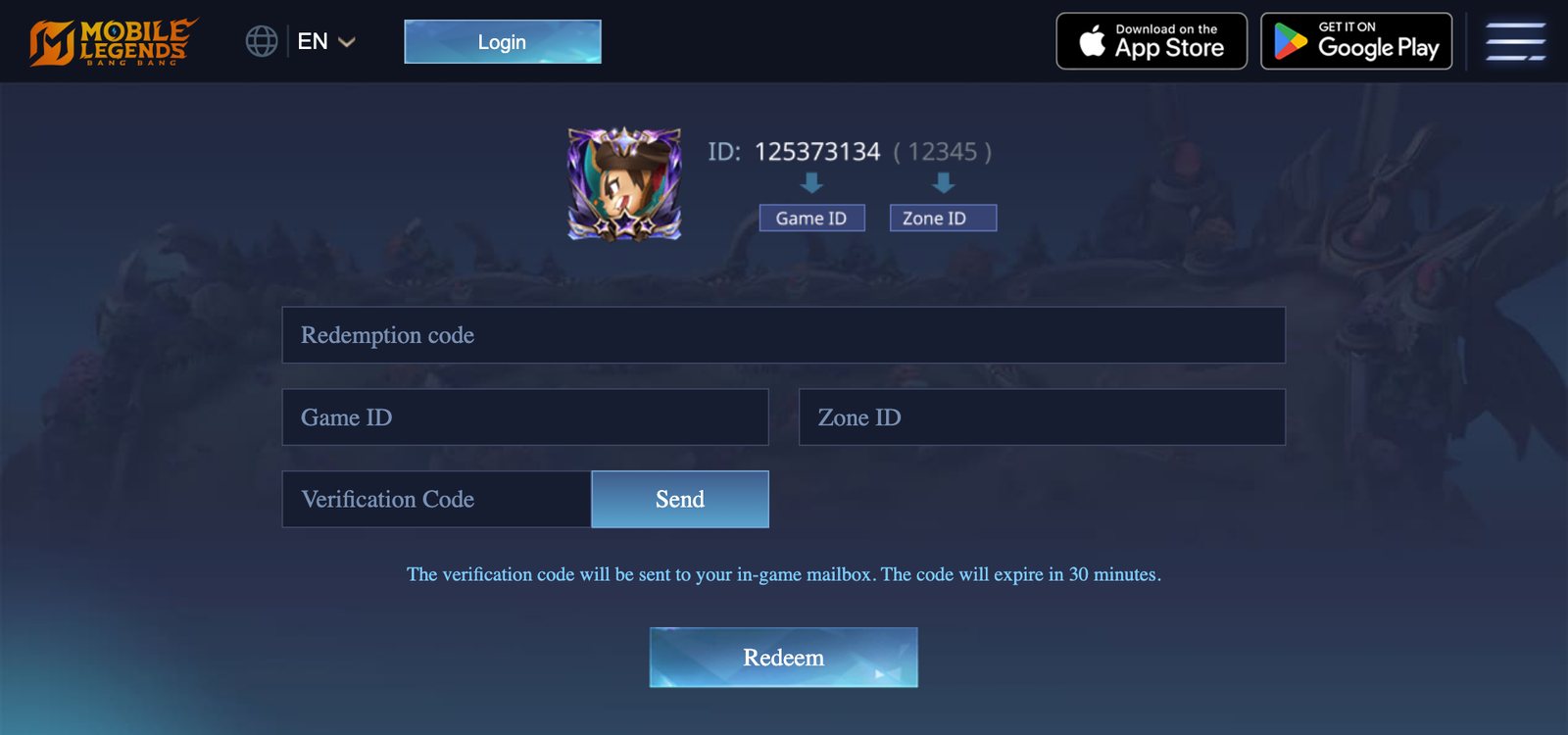
- Find your Game ID and Zone ID. Open MLBB and tap your avatar in the top-left corner. Your Game ID is shown on your profile, and the Zone ID is the number in brackets next to it.
- Open the Redeem page. Go to mobilelegends.com/redeem, or open mobilelegends.com and choose Redeem. On a phone, turn the screen sideways: the page asks for landscape.
- Enter the redemption code, your Game ID and your Zone ID.
- Tap Send. A verification code is sent to your in-game mailbox and expires after 30 minutes. Open the mail in MLBB and copy it.
- Enter the verification code and tap Redeem.
- Collect the reward from your in-game mailbox.
The verification step is there so nobody can redeem a code onto an account they don't control. It also means you need the game open on your phone while you redeem.
Where MLBB redeem codes come from
Moonton gives out codes in a few predictable places:
- Official livestreams, especially MPL broadcasts and M-series events, where codes are shown on screen for a limited time.
- Official social media accounts for the game and for regional leagues.
- Anniversary and collaboration events. The 10th anniversary this year is a likely source; see our October 2026 events guide.
- Creator giveaways run through official partner programmes.
We don't publish a daily code list. Codes expire quickly and most lists copied between websites are already dead by the time you read them. The channels above are where working codes appear first.
Why your code isn't working
| Message or symptom | Usual cause |
|---|---|
| Code has expired | Most codes last days, some only hours |
| Code has been fully redeemed | Many codes have a cap on total claims |
| Code already used | Codes can normally be claimed once per account |
| No verification mail | Wrong Game ID or Zone ID, or the mailbox needs a refresh |
| Invalid code | Usually a typing error, so paste the code rather than typing it |
Some codes are also limited to one region, so a code announced for another server may be rejected on yours.
Stay away from "free diamond" sites
Searches for redeem codes are full of sites that promise free diamonds in exchange for your login. None of them work.
- The official Redeem page asks for your Game ID, Zone ID and a mailed verification code. It never asks for your password, email login or Facebook login.
- "Diamond generators" and modified apps exist to steal accounts or install malware, and using a modified client can get your account banned.
- If a site is not on
mobilelegends.com, don't enter anything.
A real code needs your Game ID and a verification mail. Anything asking for your password is not a code, it is a phishing page.
Quick answers
Can I redeem a code inside the game? The reliable route is the official Redeem page. Reward mails arrive in game either way.
How long does the reward take? Usually seconds. If nothing arrives, restart the game and check the mailbox again.
Do codes work on every server? Not always. Region-locked codes only work on the servers they were issued for.
New to the game? Start with what MLBB is and how a match works, then our guide to ranks and game modes.
Sources: Mobile Legends: Bang Bang — Redeem (official, checked 12 October 2026); also Pocket Gamer and esports.net.